 WorkerDock
Start, find and stop each one by hand
Every project has its own folder, start command and port. Starting one means opening a terminal or asking your agent, then remembering which tab or process is which.
Cloudflare Workers manager for Mac
WorkerDock finds every Cloudflare Worker, Pages, Astro and EmDash project on your Mac. Start and stop them, stream their logs, see which D1, KV and R2 resources each one uses, and open the EmDash admin in one click.
Jump straight to the EmDash admin
All your projects in one list
See what failed to start at a glance
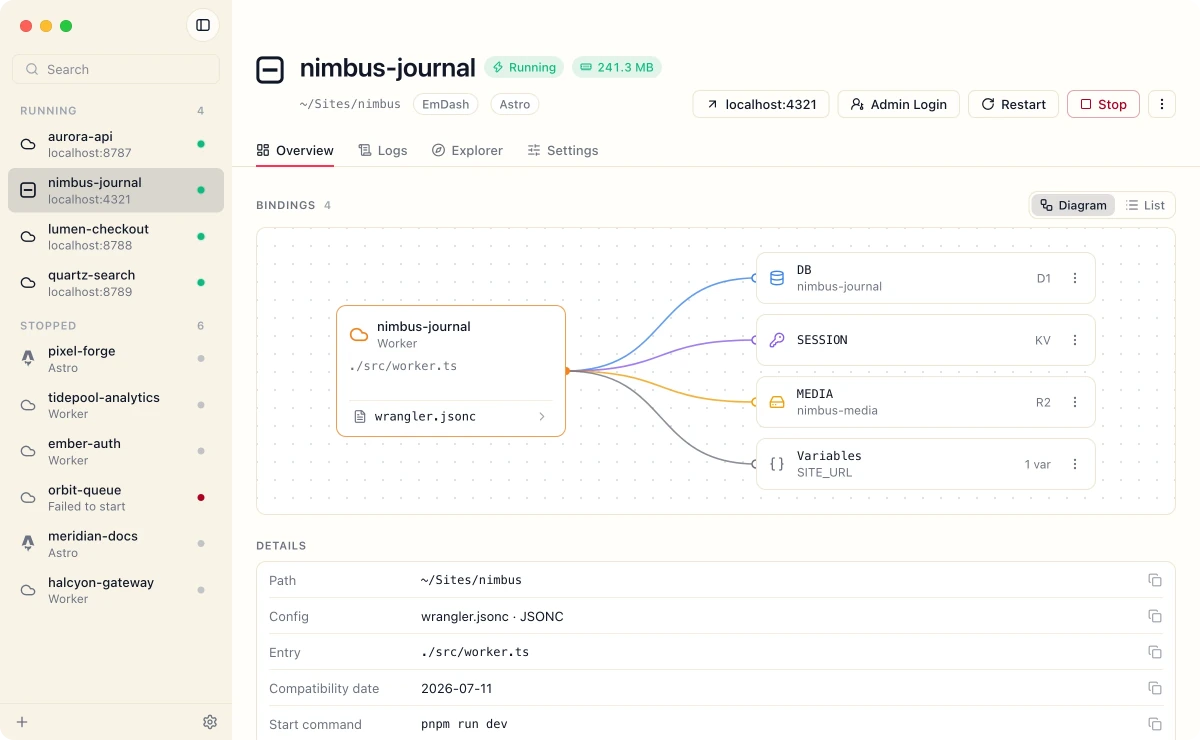
See which D1, KV and R2 each Worker uses
Each project is easy to run. Several at once means a pile of terminals, ports and processes to keep track of.
Every project has its own folder, start command and port. Starting one means opening a terminal or asking your agent, then remembering which tab or process is which.
Close a tab or end an agent session and a dev server can keep running in the background, holding a port and eating CPU. Orphaned workerd processes are a documented example (#9193).
Which D1, KV and R2 resources a Worker uses is buried in its Wrangler config, and its local data sits in a .wrangler/state folder inside each project. Seeing the full picture means opening files.
WorkerDock puts all of this in one window. See the features
Point it at a folder. WorkerDock finds every project, works out how each one runs, and gives you one clean control panel for all of them.
Scans nested folders and monorepos for Wrangler projects.
Every project with its status, port and bindings.
The right command, a free port, a clean stop.
Bindings
A live diagram of every binding a project uses. Variable names are shown, never their values.
Processes
WorkerDock picks the right command, a free port and the right folder. Stopping a project stops its workerd too, so nothing lingers.
Menu bar
Start, stop and open any project without opening the window.
Logs
Live output with real errors in colour. Ordinary output stays calm.
Discovery
Scans your folders and monorepos, and shows servers you started from a terminal as running.
Explorer
Browse local data inside the app, using Cloudflare's own Local Explorer.
Frameworks
Detects what each project is and runs the right command.
EmDash
Running an EmDash site? One click opens its admin login.
Built in Swift and SwiftUI, with the Mac's own windows, menus and keyboard shortcuts.
Reads your project folders to find Wrangler configs. It never changes them and never installs anything.
Shows variable names, never the values from vars or .dev.vars.
WorkerDock is a native Mac app that finds all the Cloudflare Workers, Pages and Astro projects on your machine and lets you start, stop and inspect them from one window, instead of juggling terminal tabs.
Yes. WorkerDock is free to download. If it proves useful, optional ways to support its development may be added later.
No. WorkerDock runs the Wrangler and dev commands already in your project and adds discovery, supervision, logs and an overview on top. Your configuration stays exactly as it is.
No. The app runs entirely on your Mac, reads your project folders without modifying them, and never shows secret values from vars or .dev.vars files. Its only network request is an update check, which you can turn off in Settings.
WorkerDock targets macOS 14 (Sonoma) or later. Cloudflare's Local Explorer, which WorkerDock embeds, needs Wrangler 4.82.1 or newer, or the Cloudflare Vite plugin 1.32.0 or newer. For older versions, WorkerDock shows the exact update command for your package manager.
WorkerDock is Mac-first and built natively for it. Other platforms aren't planned yet. Reply to any of our update emails and tell us what you'd like to see.
Yes. WorkerDock searches nested folders, so a Worker living in apps/api is found, and installs and dev scripts run in the right folder.
No. WorkerDock is an independent product by Webtions OÜ and is not affiliated with, endorsed by or sponsored by Cloudflare, Inc.
WorkerDock starts with the everyday local loop. These are ideas we're planning, not promises or dates.
Planned
List and apply your local migrations without leaving the app.
Exploring
Open project.test instead of remembering port numbers.
See requests flowing through each Worker as they happen.
Run several Workers together so service bindings just work.
Ship to Cloudflare with a click, with deploy history alongside.
Create a new EmDash site from a template and open it in WorkerDock.
Edit local variables safely, with values masked by default.